Installments
Installments allow customers to split a payment into multiple smaller payments over time. Customers can choose from the installment options you configure when paying an invoice or payment link.
Note: Installments are only available for one-time products. They are automatically disabled for recurring products (subscriptions).
How Installments Work
When a customer selects an installment option, Stream automatically calculates the amount for each installment and schedules them based on the split period. Each installment becomes a separate payment with its own due date.

Example: 1,000 SAR split into 3 monthly installments:
- Installment 1: 333.33 SAR (due on payment date)
- Installment 2: 333.33 SAR (due 1 month later)
- Installment 3: 333.34 SAR (due 2 months later)
How Installment Amounts Are Calculated
Installment amounts depend on the option: the total can be split by percentage (equal or custom shares) or into fixed amounts, optionally after a down payment. If the amount doesn't divide evenly, any rounding difference is added to the last installment to ensure the total always equals the original payment amount.
For example, 999.98 SAR split into 3 equal installments results in: 333.33 SAR, 333.33 SAR, and 333.32 SAR (the last installment is reduced by 0.01 SAR to account for the rounding difference).
Note: The total of all installments always equals the original payment amount.
Configuration
Configure installment settings in your Payment Settings. Invoice and payment link settings are configured separately.
Enable/Disable Installments
API
When creating an invoice via the Invoices API or a payment link via the Payment Links API, you can enable or disable installments with the payment_methods parameter. Set installment: true to enable installments or installment: false to disable them for that specific invoice or payment link.
For payment links, this setting overrides the organization's default payment link installment settings. If you don't include the payment_methods parameter, the organization's default settings will be used.
Settings Page
You can configure the default installment settings in your Payment Settings:
- For invoices: Enable or disable installments in the invoice payment options
- For payment links: Enable or disable installments in the payment link payment options (these defaults apply when creating payment links via the UI or when the API request doesn't specify
payment_methods)
Split Options
Configure the installment options available for customers to choose from, including the number of installments (2 to 52) and the split period, the interval between installments (from monthly up to yearly). Each option can use a different split period.
Minimum Amount
The minimum installment amount is 100 SAR per installment by default. If the payment amount divided by the number of installments is less than 100 SAR, that installment option will not be available.
For example, with a payment of 250 SAR:
- 2 installments: 125 SAR each ✅ (available)
- 3 installments: 83.33 SAR each ❌ (not available, below minimum)
The minimum amount cannot be changed through the API or dashboard. Contact Stream support to modify this value.
Payment Plans and Which One Applies
Installment options are grouped into payment plans, configured in your Payment Settings. Invoices and payment links have separate plans, and each plan is set for one currency.
| Plan | Applies to | Notes |
|---|---|---|
| Main payment plan | Any amount not covered by a custom plan | One per currency for invoices and one for payment links. It cannot be deleted, but it can be disabled. |
| Custom plan | Totals within a minimum and maximum amount (inclusive) | Ranges cannot overlap. |
| Override plan | Only the invoices or payment links you assign it to | Has a name and is never applied automatically. See Override Plans. |
Stream picks the plan for an invoice or payment link in this order:
- Override plan: if one is assigned and enabled, its options are offered whatever the amount.
- Custom plan: if the total falls within a custom plan's range, that plan is used.
- Main payment plan: used for every other amount.
A disabled plan turns installments off for everything it would apply to. For example, if you disable the main payment plan, installments are off by default but are still offered for amounts covered by an enabled custom plan. If a custom plan covers the amount but is disabled, installments are off for that amount. They don't fall back to the main payment plan.
Split Types and Down Payment
Each installment option splits the total in one of two ways.
Percentage
Each installment is a percentage of the total. Choose the number of installments, then enter a percentage for any installment you want to set. Percentages you enter are used as is, and the rest of the 100% is split equally across the installments you leave blank. All installments must add up to 100%.
For example, with 3 installments:
- No percentages entered: 33.33% each
- 50% entered for the first installment: 50%, 25%, 25%
Fixed Amount
Each installment is a fixed amount, and the number of installments depends on the total. If the total doesn't divide evenly:
- A remainder of 10 SAR or more becomes its own final installment. This final installment may be below the minimum installment amount.
- A smaller remainder is added to the last installment.
For example, with a fixed amount of 300 SAR:
- 1,050 SAR: 300, 300, 300, 150 SAR
- 905 SAR: 300, 300, 305 SAR
Down Payment
An option can start with a fixed down payment. The down payment is charged first, and the rest of the total is split by the option's percentages or fixed amount. The down payment must be at least 10 SAR and less than the total.
For example, 1,000 SAR with a 250 SAR down payment and three equal installments gives 250 SAR now, then three installments of 250 SAR.
Coupons on Payment Plans
You can attach coupons to a payment plan to reward a customer's choice:
- Option coupon: applied when the customer picks that installment option.
- Full-price coupon: applied when the customer pays the full amount instead of choosing installments. It's only shown when the payment has installment options.
Override Plans
Use an override plan to offer a specific plan to a particular customer or deal, regardless of the amount. Create the override plan in your Payment Settings, then copy its ID from the plan's menu:
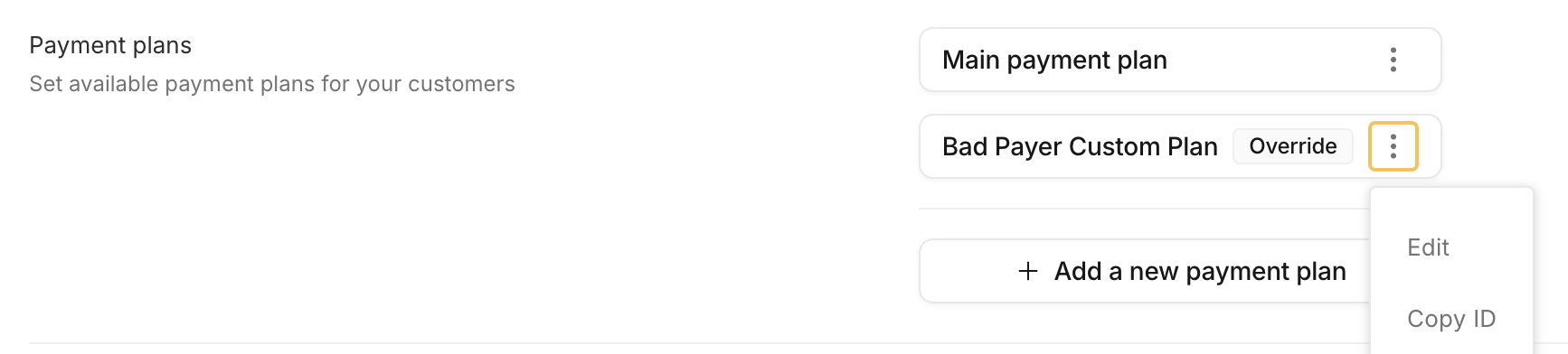
Pass the ID as installment_rule_override_id when creating the invoice or payment link:
{
  "installment_rule_override_id": "<override plan ID>"
}
- The plan must be an enabled override plan with at least one option, for the same context (invoice or payment link) and the same currency. Otherwise the request fails with
INSTALLMENT_OVERRIDE_RULE_NOT_AVAILABLE. - The customer is offered only that plan's options. The minimum installment amount still applies.
- On an invoice, the override can be changed until the invoice is split into installments. On a payment link, it can only be set when the link is created.
- If an assigned override plan is later disabled, installments are turned off for that invoice or payment link. If it's deleted, the normal plan selection applies again.
- Editing a plan changes what unpaid invoices and payment links using it offer. Invoices already split into installments keep their schedule.
Installments Start Date
By default, the second installment is due one split period after the first payment. Set installments_start_date to choose the second installment's due date. Later installments follow on the option's split period from that date.
Example: a monthly option with 3 installments and an invoice due on January 1:
- Without
installments_start_date: installments are due January 1, February 1 and March 1. - With
installments_start_dateset to February 4: installments are due January 1, February 4 and March 4.
The start date can be set on invoices and, at creation only, on payment links. For a payment link:
- The start date must be later than
created_resource_effective_at, or later than now if that field isn't set. - The first payment is due on
created_resource_effective_at, or when the customer pays. - It can't be set on subscription, trial or metered payment links, or on links where installments are turned off.